
Whether you use basic or advanced mode, the async flow will be triggered.
To make use of it, you will find an id in your Search response:

Once this id is received, you just need to add it to your search request to (re)trigger it:
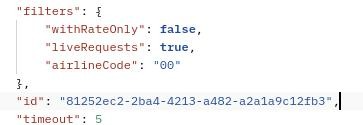
Then the API will take care of fetching the missing results that are available at the time you request the search with the id.
BASIC and ADVANCED Search Modes
We offer two operational modes for this endpoint.
In the BASIC mode, responses may take longer due to partners' response times, but you get all your search results in 1-3 API calls. To use the BASIC mode, either set a higher timeout (max value is 25 seconds) or omit the timeout field, making it take the default value of 25 seconds.
Conversely, in the ADVANCED mode you can get fast-updating search results by setting a shorter timeout and recalling rapidly within the specified time frame.
In both modes, if the status is COMPLETED, you've received all results; if the status is STARTED, you need to iterate your search using the provided id until the status switches to COMPLETED.